

Introduction
Google Maps has changed how people search, discover, and choose local businesses. Whether someone needs a salon, café, doctor, gym, hotel, or digital agency — their first instinct is to search “near me” on Google Maps.
This makes Google Maps one of the most powerful tools for visibility, leads, footfall, and trust.
Let’s start boosting your local presence like a pro.
What Is Google Maps?
Google Maps is a free mapping and navigation service by Google that helps users discover places, directions, businesses, and local services around them.
But for business owners, Google Maps is much more than a map:
- It’s a local business directory
- A lead-generation tool
- A trust-building platform
- A powerful Local SEO channel
- A key factor in footfall, online reputation, and customer discovery
Businesses listed on Google Maps appear in:
- Google Search
- Local Pack (Top 3 positions)
- “Near Me” searches
- Google Maps app & desktop
- Voice search (“Find restaurants near me”)
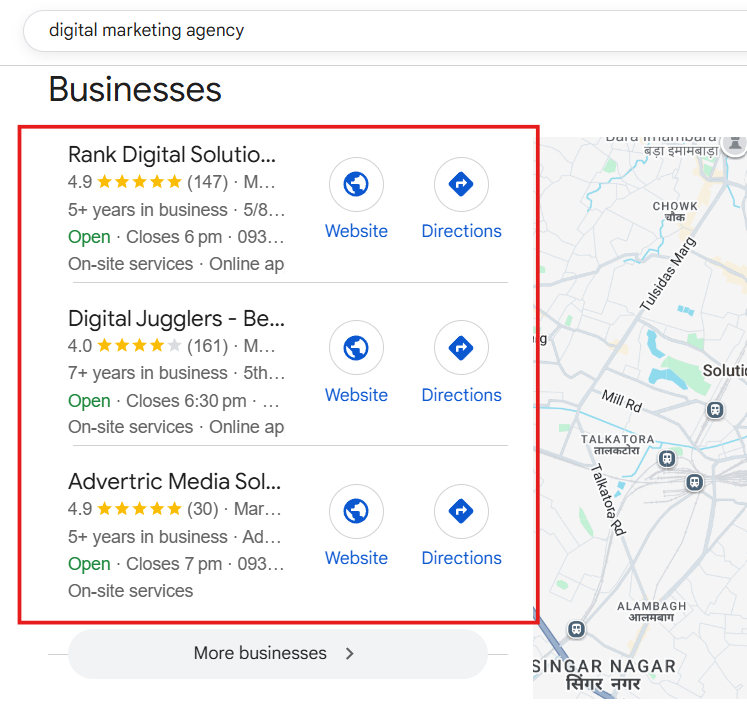
In short: If you’re not on Google Maps, you’re invisible to customers.
How Google Maps Works (Simple Explanation)
Google Maps relies on location data, business information, user intent, and Google Business Profile (GBP) details.
Here’s how it works:
1. Understanding Search Intent
Google identifies whether someone is looking for:
- A service (“salon near me”)
- A store (“mobile shop in Lucknow”)
- A place (“restaurants in Hazratganj”)
- A professional (“doctor near me”)
Then it shows the most relevant businesses.
2. Google Analyzes Relevance
Google matches the user’s keyword to the listing’s:
- Category
- Business description
- Services
- Products
- Reviews
- Website content
The more relevant your profile, the higher your ranking.
3. Distance
Google prioritizes businesses closest to the searcher’s location.
Even a 2 km difference can change the ranking.
4. Prominence
Prominence = how popular your business appears to Google.
Google checks:
- Reviews
- Ratings
- Website authority
- Backlinks
- Citations
- Photos
- User engagement
- Search volume of your brand
The more prominent you are → the better your ranking.
5. Activity & Freshness
Google boosts businesses that stay active:
- Regular posts
- Recent photos
- New reviews
- Quick replies to customers
This proves your business is alive and trustworthy.
How to Get Listed on Google Maps (Step-by-Step)
Listing your business on Google Maps is free and takes just a few minutes.
Follow these steps:
1. Visit Google Business Profile
Go to the official website:
👉 google.com/business
2. Sign in Using Your Gmail
Prefer using your business email.
3. Enter Your Business Name
Make sure it is:
- Exact brand name
- No extra keywords
- No spam words
❌ Don’t use: “Best Salon in Lucknow – ABC Salon”
✔ Use: “ABC Salon”
4. Choose the Correct Business Category
This is a major ranking factor.
Examples:
- Salon → “Beauty Salon”
- Restaurant → “Indian Restaurant”
- Gym → “Gym”
- Digital agency → “Marketing Agency”
You can add secondary categories later.
5. Add Your Business Address
Ensure NAP (Name-Address-Phone) matches everywhere.
NAP consistency boosts ranking.
6. Add Your Service Areas (If Applicable)
Useful for:
- Plumbers
- Electricians
- Digital agencies
- Technicians
- Tutors
You can add multiple areas.
7. Add Phone Number & Website
This adds trust and authenticity.
8. Verify Your Business
Google may send:
- Postcard
- Phone OTP
- Email
- Video call verification
Verification is mandatory for your listing to go live.
9. Complete Your Profile
Fill in:
- Business description
- Opening hours
- Services
- Products
- Photos
- Logo
- Cover photo
A complete profile performs 7X better.
How to Rank Higher on Google Maps (Proven Local SEO Strategy)
Google Maps ranking depends on optimizing your GBP + website + local presence.
Here is the complete roadmap:
1. Choose the Right Category
Use the most accurate primary category.
Example:
A makeup artist shouldn’t select “Beauty Salon” —
they should select “Make-up Artist”.
2. Add Secondary Categories
Examples:
A salon can add:
- Hair Salon
- Beauty Salon
- Nail Salon
A restaurant can add:
- Indian Restaurant
- Fast Food Restaurant
- North Indian Cuisine
Categories help Google understand your business.
3. Upload High-Quality Photos
Photos increase:
- Engagement
- Trust
- “Direction requests”
- Visibility
Upload:
- Interior photos
- Exterior photos
- Team photos
- Service photos
- Cover & logo
4. Get Consistent Reviews
Reviews = Ranking Booster
Ask customers to mention:
- Service name
- Location
- Experience
Example:
“Great haircut at XYZ Salon in Hazratganj!”
Google reads keywords inside reviews.
5. Add All Services & Products
This improves your relevance score.
Example:
A gym should add:
- Weight training
- Zumba
- Cardio
- Personal training
- Yoga
Each service strengthens your keyword visibility.
6. Use Google Posts Weekly
Post:
- Offers
- Announcements
- Events
- Discounts
- New products
Weekly activity boosts ranking.
7. Build Local Citations
List your business on:
- Justdial
- IndiaMart
- Yelp
- Yellow Pages
- Local business directories
Citations improve prominence.
8. Optimize Your Website for Local SEO
Important steps:
- Use local keywords
- Add your city in title tags
- Use <LocalBusiness> schema
- Add Google Maps embed
- Ensure mobile-friendly pages
Your website and Maps ranking support each other.
Why Google Maps & Local SEO Are Important for Business
2026 Updated Statistics
- 86% of customers use Google Maps to find businesses
- 72% visit a store within 24 hours of searching
- Businesses with complete profiles get 7X more clicks
- Listings with photos get 42% more direction requests
- 90% of people trust online reviews before trying a business
This proves how essential Maps is for local businesses.
Google Maps can directly increase:
- Footfall
- Calls
- Leads
- Sales
- Customer trust
- Brand visibility
Without Maps, you’re invisible to local customers.
Competitor Analysis on Google Maps (Complete Guide)
Competitor analysis helps you understand:
- Why they rank above you
- What they’re doing better
- Where you can improve
Follow this step-by-step method:
1. Identify Top Competitors
Search your keyword and list the top 5.
2. Study Their Categories
Check primary + secondary categories.
3. Analyse Their Reviews
Look at:
- Frequency
- Keywords
- Rating
- Reply style
4. Study Their Photos
If they upload daily and you don’t, they will outrank you.
5. Review Their Business Description
Identify key phrases and style.
6. Check Their Website SEO
If they have strong local pages — it boosts Maps ranking.
7. Check Their Citations
Search them on Google → See where they appear.
8. Observe Engagement
Reviews, photos, Q&A, popularity times — all matter.
9. Test Rankings In Different Areas
Search from different locations to understand proximity ranking.
10. Create a Competitor Report
List:
- Strengths
- Weaknesses
- Opportunities
Use it to outrank them.
Google Maps Profile Audit (Step-by-Step)
A Google Maps audit helps find issues affecting ranking.
1. Check NAP Consistency
Same name, address, phone everywhere.
2. Review Categories
Ensure correct and updated categories.
3. Analyse Description
Include natural keywords.
4. Check Services & Products
Add all relevant items.
5. Evaluate Photos
High-quality, recent images are required.
6. Review Strategy
Check review frequency, responses, and quality.
7. Posting Activity
Weekly posts improve ranking.
8. Engagement Signals
Check GBP Insights.
9. Website Integration
Must include map embed, schema, local keywords.
10. Citation Audit
Ensure data accuracy across directories.
11. Policy Check
Avoid keyword stuffing in business names or duplicate listings.
Google Maps Top Ranking Factors (Table)
| Ranking Factor | Importance | Affects |
| Categories | ⭐⭐⭐⭐⭐ | Relevance |
| Reviews | ⭐⭐⭐⭐⭐ | Trust & Prominence |
| NAP Consistency | ⭐⭐⭐⭐⭐ | Local SEO |
| Photos | ⭐⭐⭐⭐ | Engagement |
| Website Local SEO | ⭐⭐⭐⭐ | Maps + organic |
| Citations | ⭐⭐⭐⭐ | Authority |
| Proximity | ⭐⭐⭐⭐⭐ | Search visibility |
| Activity | ⭐⭐⭐ | Freshness |
| Attributes | ⭐⭐⭐ | Relevance |
| CTR & Engagement | ⭐⭐⭐⭐ | Prominence |
Conclusion: Google Maps + Local SEO = Business Growth
Google Maps is not just a map — it’s a lead engine.
With optimized categories, photos, reviews, services, website SEO, and competitor strategy, any business can dominate the local search market.
Businesses that stay active on Maps grow faster, get more customers, and build a stronger brand reputation.
FAQs About Google Maps & Local SEO
How long does it take to rank?
30–90 days depending on competition.
Do reviews affect ranking?
Yes — reviews are one of the strongest ranking signals.
Can new businesses rank quickly?
Yes, with proper category selection, photos, and reviews.
Why am I not ranking in Maps?
Common reasons:
- Wrong categories
- No reviews
- No local SEO
- Less activity
- Weak website